Budgie 10.10 (Wayland) – Practical test on Solus
Test performed as a real-world evaluation of Budgie 10.10 on Wayland in a production environment. After testing, the system was rolled back to Budgie 10.9 (X11).
1. Required packages (runtime – Wayland + labwc)
sudo eopkg it \
labwc wlroots seatd \
xdg-desktop-portal-wlr libliftoff libsfdo xcb-util-errors \
grim slurp
Essential packages to run a Wayland session (wlroots + labwc)
2. Budgie Packages
Install the compiled Budgie 10.10 packages (without -devel packages):
sudo eopkg it \
budgie-desktop-10.10.0-2-1-x86_64.eopkg \
budgie-desktop-view-10.1-1-1-x86_64.eopkg \
budgie-desktop-services-1.0.2-1-1-x86_64.eopkg \
budgie-control-center-2.1.0-2-1-x86_64.eopkg \
budgie-session-1.0.0-1-1-x86_64.eopkg \
budgie-desktop-docs-10.10.0-2-1-x86_64.eopkg
DO NOT install budgie-desktop-devel package — it will pull in unnecessary -devel dependencies. The -devel package is only needed for compiling Budgie applets/plugins.
3. Additional manual steps (Perform before reboot)
sudo mkdir -p /usr/lib64/budgie-desktop
sudo ln -sf /usr/lib64/gnome-settings-daemon/gsd-* /usr/lib64/budgie-desktop/
Update: Manual linking is no longer required for Budgie Control Center 2.1 (BCC-2.1).
4. Applied settings (gsettings + labwc)
gsettings set org.gnome.desktop.input-sources sources "[('xkb','pl')]"
gsettings set org.gnome.desktop.interface gtk-theme 'adw-gtk3-dark'
gsettings set org.gnome.desktop.interface color-scheme 'prefer-dark'
Keyboard and theme settings applied via gsettings
~/.config/budgie-desktop/labwc/environment

XKB_DEFAULT_LAYOUT=pl
XKB_DEFAULT_VARIANT=basic
XKB_DEFAULT_OPTIONS=
Forcing the keyboard layout at the compositor level (wlroots)
IMPORTANT: Budgie uses its own config directory (~/.config/budgie-desktop/labwc/), NOT the standard ~/.config/labwc/. The startup script automatically copies default configs on first run, then you can modify them.
5. Identified issues (Wayland)
- Polish keyboard layout issue — The default config had XKB_DEFAULT_LAYOUT=gb,us(intl) in ~/.config/budgie-desktop/labwc/environment, causing wrong characters to display. Solution: Change to XKB_DEFAULT_LAYOUT=pl with VARIANT=basic.
- White title bars in certain applications (xed, nemo, discord, tzclock) — CSD/libadwaita apps ignore dark theme on Wayland. This is an application-level bug, not a Budgie issue. GTK apps like Tilix, BCC, and Budgie Settings work correctly.
- Dock on the bottom panel is not centered despite position='center' being set in dconf. Auto-hide works, but positioning is broken. Side panels (left/right) center correctly.
- Budgie Control Center missing the Display section (no resolution or scaling options).
- Mouse cursor theme: Works correctly when set in ~/.config/budgie-desktop/labwc/environment with XCURSOR_THEME and XCURSOR_SIZE variables.
- org.buddiesofbudgie.BudgieScreenshot -i does not work.
- Satty requires a workaround by saving to a file:
grim -g "$(slurp)" /tmp/screen.png && satty --filename /tmp/screen.png
6. Conclusion
Budgie 10.10 on Wayland in its current state is not suitable for daily use. There are significant functional gaps and regressions compared to Budgie 10.9 (X11).
Visual Evidence / Screenshots
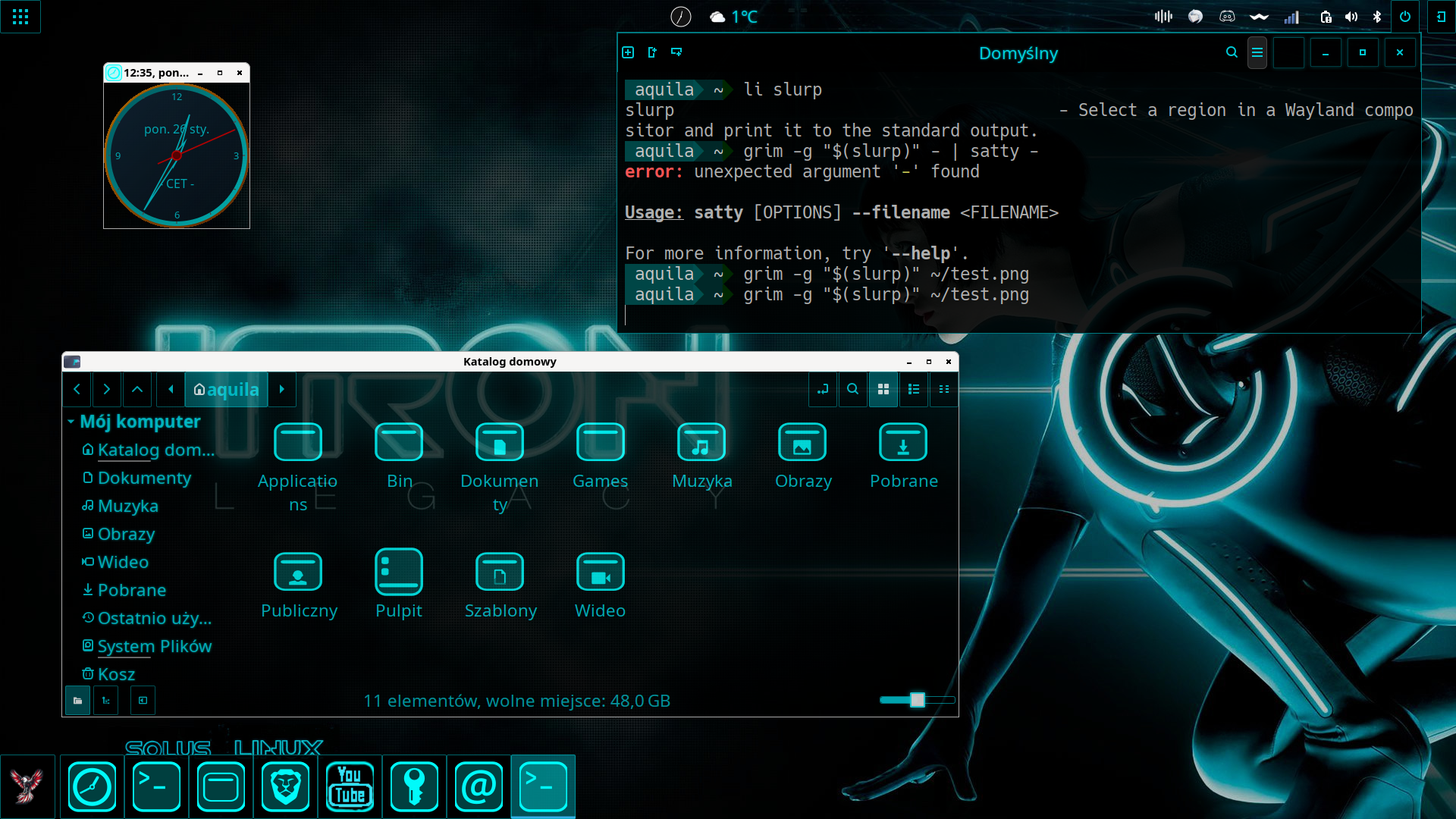
// Widok białych belek w aplikacjach (Nemo/Xed)
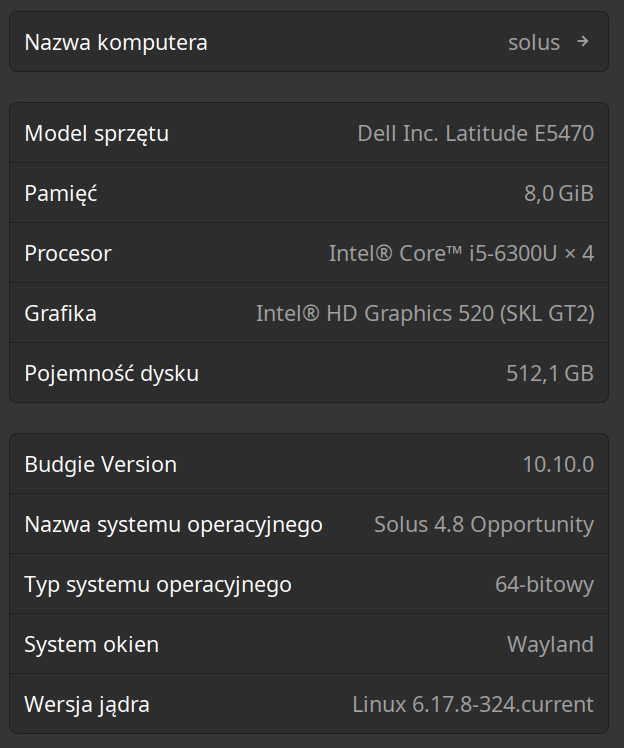
// Test Environment Details
Update: 2026-01-30
Resolved Issues
- 1. System Integration & Settings: Installation of python-systemd resolved persisting cursor and desktop settings.
- 2. Window Decorations: Fixed via themes containing a native openbox-3 directory.
- 3. Panel Alignment: Achieved centered look using Dynamic Spacers instead of "Dock Mode".
- 4. Keyboard Shortcuts: Fully operational after adding python-systemd dependency.